Minor clients
Working with children and adolescents means working with their parents: guardians sign the consents, receive the paperwork, pay the bills, and often join the sessions. Practice Harbor routes all of that through guardian contacts with their own portal access, while the clinical record stays the child's.
In this guide, we'll cover:
- Adding a minor client
- How guardian access works
- Intakes and consent for minors
- Billing for minors
- Telehealth with minors
- FAQ
Adding a minor client
- Click + → New Client and choose the Minor type.
- Client tab — the child's name, date of birth, and billing type. Their own email/phone are optional and deliberately separate from the parent's.
- Contact tab — at least one parent or guardian with an email (that's what portal access hangs on), their relationship, and Responsible for billing on the payer.
- Click Create Minor Client.
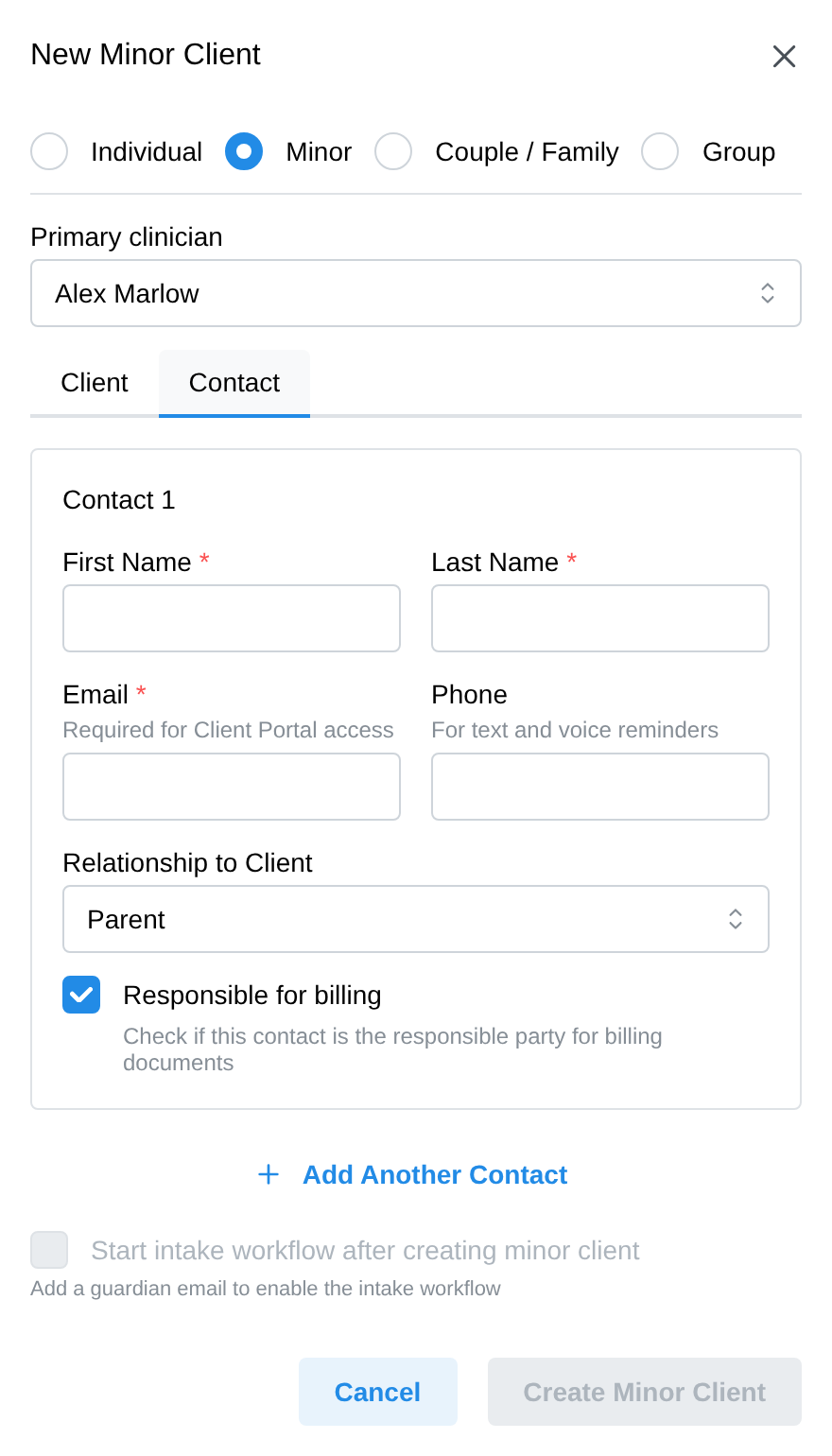
The step-by-step is in Adding a client. If a minor is ever missing a guardian, the chart tells you — a banner on the client's profile ("This client is a minor. Remember to add a parent or guardian in the Contacts tab.") and a Minor Without Guardian alert on the Contacts tab.
How guardian access works
Each guardian is a contact with their own portal login — they sign in as themselves, and the portal shows them "managing" their child. What they can do is controlled per guardian by five checkboxes on the Contacts tab: view the child's appointments, request appointments, send and receive secure messages, access billing documents, and pay the balance. All five start on; untick what a particular guardian shouldn't have.
Two parents? Two logins. Add both as contacts, each with their own email — each gets an independent portal account with independent permissions. That's the tool for separated parents: for example, give both parents scheduling visibility but only the paying parent billing access. A parent with several children in your practice gets a profile chooser and can switch between the kids they manage under one login.
The minor's own login is optional. By default, everything routes to guardians. An adolescent with their own email can get their own portal access — you choose that explicitly when sending intakes — which is useful when they should complete their own measures privately.
Guardians see what's shared with them, not everything. A guardian's portal shows the forms and documents sent to them, billing/consent paperwork, and the message conversations you've made visible to them (a Guardian visibility choice when you start a conversation). An adolescent's own portal activity — measures they complete themselves, their own message threads with you — stays theirs unless you explicitly share it.
To invite a guardian, use Send Portal Invitation on their contact card (sending intake forms does this automatically). To cut access off, Disable Portal Access on the same card.
Intakes and consent for minors
Sending intake to a minor starts with who receives what: every guardian with an email is included by default, the minor only if you select them. Each recipient then gets their own document selection and their own email (guardians get the Guardian Welcome template).
- Guardians sign as themselves. A consent form completed in a guardian session records the guardian as the signer — with their name, date and time — so the clinical record shows the responsible party, not the child.
- Demographics still belong to the child. The demographics form — whoever fills it — writes to the minor's chart.
- One household inbox is handled. If both parents share an email address, the wizard warns you: each still gets their own portal profile and their own copy of the forms at that inbox — consider sending to just one of them.
See Intake forms for the wizard itself.
Billing for minors
A minor is never their own guarantor — bills always go to a guardian:
- The guardian marked Responsible for billing becomes the guarantor on the child's billing account; change it anytime with the same checkbox on the Contacts tab.
- Cards on file and AutoPay charge the guardian's saved payment method.
- Guardians with the billing-documents permission see invoices and statements in their portal and can pay there.
Telehealth with minors
Guardians can join the child's video session from their own portal login — you'll see them labeled with the relationship, e.g. "Gwen S. (mother of Jamie)", in the session. An adolescent with their own portal login can join directly themselves.
FAQ
What happens when a client turns 18? Guardian portal access ends automatically on the client's 18th birthday (a nightly check handles it), and the practice gets a task and email suggesting next steps. The rest stays yours to review by hand: typically add the client's own email and portal access, move billing responsibility to them (untick the guardian's Responsible for billing), and re-invite the guardian only if the now-adult client consents to their continued involvement. For the automatic cutoff to protect a client, their chart needs a date of birth — if any guardian-linked clients are missing one, the practice gets a monthly reminder task listing them.
Can I limit what one parent sees without affecting the other? Yes — permissions are per contact. Each guardian's five checkboxes are independent.
The guardian isn't getting the intake emails. Check their contact card has the right email and that they were selected as a recipient when the intake was sent; re-send if needed. Their portal status badge (Invited / Active) on the contact card tells you whether they've ever activated.
Can the child message me privately? Only with their own portal login (their own email, selected as an intake recipient). Guardian and child are separate senders in the same conversation thread, so you can always tell who wrote what.