Cancellations, no-shows, and late-cancel fees
When a session doesn't happen, the appointment's status tells the rest of the system what to do — reminders stop, the session's charges come off the books, and, for a late cancellation or no-show, you can charge a fee in the same step. This page covers the whole flow, including how to undo it.
In this guide, we'll cover:
- Marking an appointment cancelled, late cancelled, or no-show
- Charging or waiving a fee
- What happens to the session's billing
- Undoing a cancellation
- FAQ
Marking an appointment cancelled, late cancelled, or no-show
- Open the appointment from the calendar (or from the client's chart).
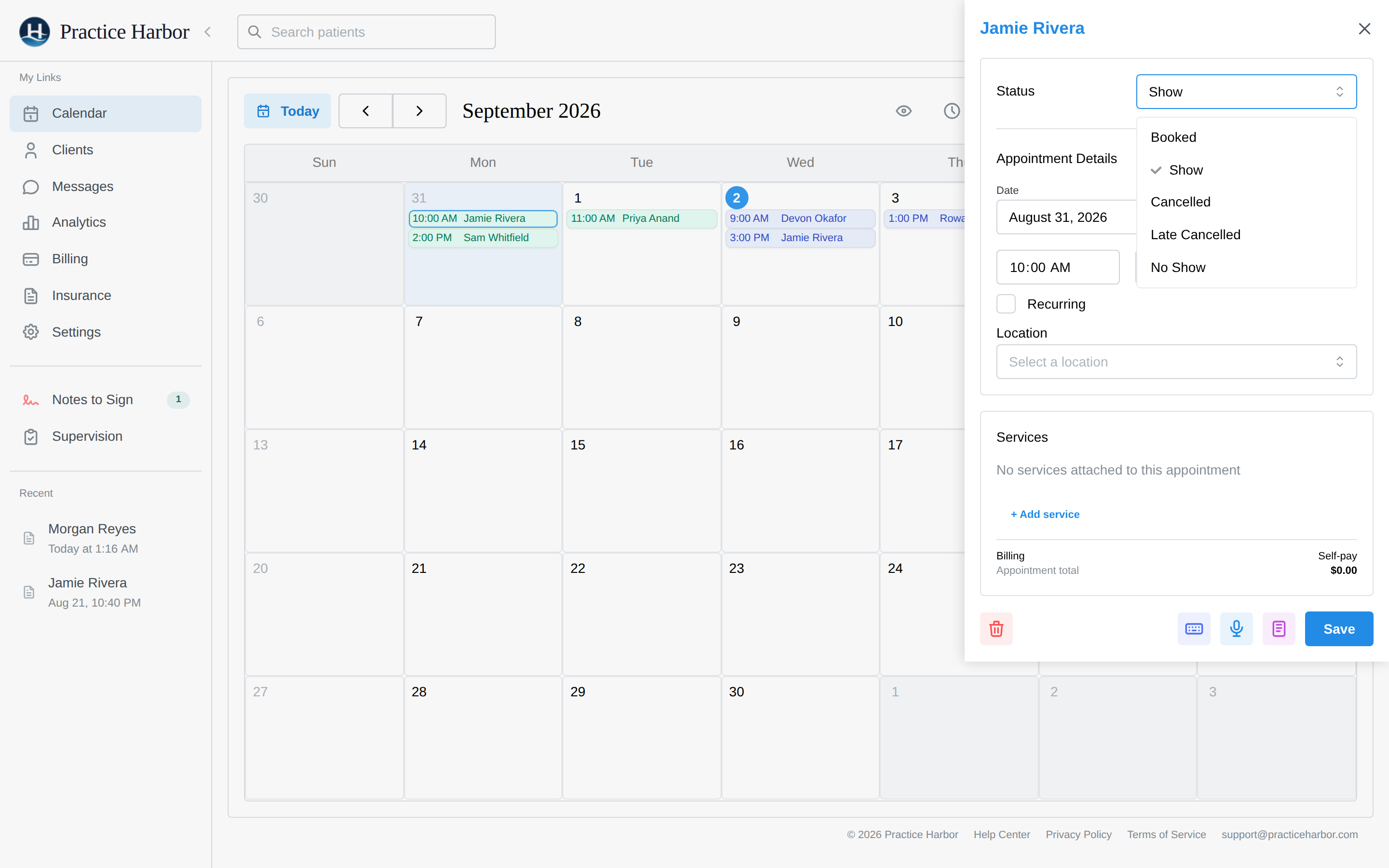
- Change the status dropdown. The choices are Booked, Show, Cancelled,
Late Cancelled, and No Show:
- Cancelled — the ordinary case: enough notice, no fee involved.
- Late Cancelled — cancelled inside your practice's notice window; the fee panel opens with the fee on.
- No Show — the client simply didn't come; the fee panel opens with the fee off, as an opt-in.
- Click Save.
Once an appointment is cancelled its reminders stop — nothing further is sent to the client for that session.
For a recurring series, marking one session cancelled affects only that session — the rest of the series stays on the calendar.
Charging or waiving a fee
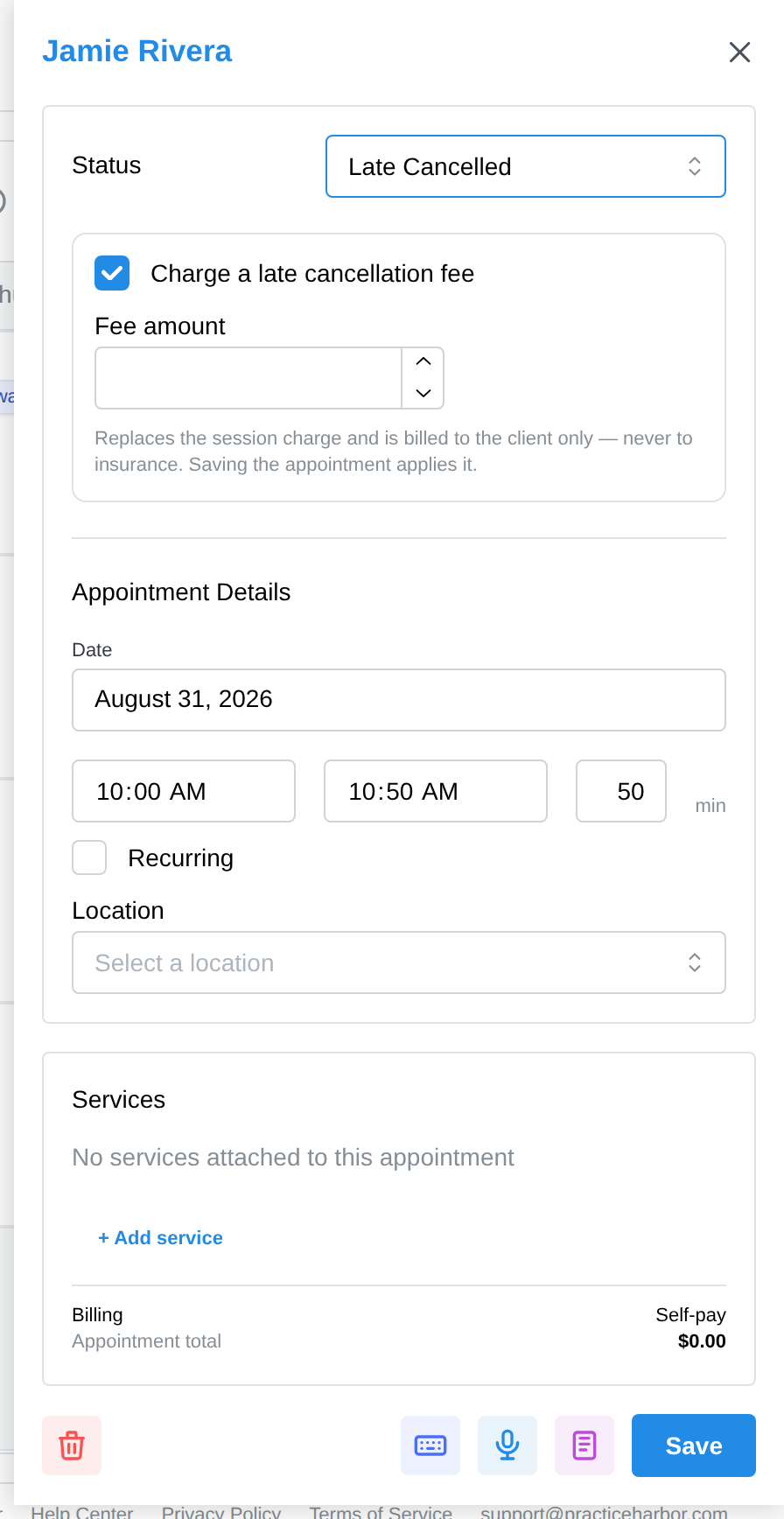
When you pick Late Cancelled or No Show, a fee panel appears in the same drawer:
- The Charge a late cancellation fee (or Charge a no-show fee) checkbox controls whether anything is charged at all. Late Cancelled defaults it on; No Show defaults it off. Nothing ever charges without this checkbox — Save applies your decision.
- The amount prefills with that session's own fee — the same amount the appointment would have billed. Edit it down (or up) for this one appointment, or uncheck the box to waive it entirely.
- Click Save.
There's no separate "default cancellation fee" to configure — the session's fee is the default, and every fee decision is made per appointment, where you can see the context.
What happens to the session's billing
Marking a session Cancelled, Late Cancelled, or No Show removes its service charges — a session that didn't happen can't bill its CPT codes. If you charge a fee, one cancellation-fee line replaces them.
Two guarantees worth knowing:
- Cancellation fees never go to insurance. The fee is always the client's own responsibility — it can't appear on a claim and doesn't read through a copay split. This is by design (and matches payer rules: you can't bill insurance for a session that didn't occur).
- The fee behaves like any other client charge afterward: it shows on the client's billing tab, lands on invoices, and is collected the same way as a session fee — including by AutoPay, if the client is enrolled.
Undoing a cancellation
Set the status back to Booked (or Show, if the session actually happened):
- The cancellation fee is removed. If the fee has already landed on an issued invoice, you'll be prompted to delete that invoice from the client's Billing tab first, then save again — the fee is never silently pulled out from under an invoice.
- The session's own charges come back, so its billing picks up where it left off.
FAQ
Who can do this? Anyone who can edit appointments — clinicians for their own calendars, and practice managers, schedulers, and billers for any calendar. Handling late-cancel and no-show fees is billing work, so biller seats can do the whole flow.
Where do I put my cancellation policy in writing? Your intake paperwork — most practices state the notice window and fee in their consent or practice-policies form (see Intake forms). The status you pick when it happens is how you apply the policy; the paperwork is where the client agreed to it.
Can clients cancel from the portal? Clients can request changes from the portal's appointments page; how much notice they can give is up to your conversation with them — marking the status, and whether it counts as a late cancellation, stays in your hands.
Does a cancelled session still show on the calendar? Yes, visibly marked as cancelled, so the history of the day stays honest. Deleting an appointment outright is a separate action for things that should never have been on the books.
Can I charge a fee on an insurance client? Yes — the fee simply bypasses insurance entirely and bills the client directly, whatever their usual billing type.